Opening Fran-Trak to AI agents: MCP, MCP Apps and WebMCP
What each integration does in a restaurant back office, and what it took to make them work across AI assistants.
Fran-Trak is reporting and operations software for multi-unit businesses, including restaurant franchise brands. Its web portal has run since 2015 and covers daily sales, labor, waste, inventory, menus and online orders. Most of its users, from franchisors to store managers, start the day with the same question: how did my stores do yesterday?
I wanted them to ask that question in the AI assistant they already use and get an answer from their own data. Over a few weeks I built three integrations:
| Integration | Runs in | Acts as | Best for |
|---|---|---|---|
| MCP server | Fran-Trak’s servers, behind one HTTPS endpoint | The signed-in portal user, through OAuth | Questions and actions from any assistant |
| MCP Apps | A sandboxed frame in the assistant’s chat | The same user, through the server’s tools | Charts, tables and buttons in the conversation |
| WebMCP | The user’s browser tab | The user’s existing portal session | Help with the page that is open |
MCP server
The MCP server is built on the official C# MCP SDK and serves streamable HTTP from a single endpoint.
It uses the accounts operators already have. The server is its own OAuth 2.1 authorization server: an assistant registers itself, sends the user to a Fran-Trak sign-in page and receives a token for that user. Sign-in applies the portal’s password and lockout rules, counts failed attempts together with portal sign-ins, and records every assistant sign-in in the portal’s login history, where owners already look.
Every tool runs as that user. The user’s portal role determines which stores they can see, and the server applies that scope before any query runs, so the model never sees a store the user could not open in the portal. Reports read through a read-only database account.
The server exposes 22 tools. Seven change store data: order status, refunds, customer messages, inventory par levels, menu prices, and out-of-stock and back-in-stock flags. The rest read data, including sales summaries, top sellers, 17 standard reports, dashboard alerts, a same-day status for each store, inventory estimates, reorder suggestions, online orders and menu lookups.
Tool descriptions
The most useful fix after launch was to text rather than code. Shortly after release, Claude answered “how did stores A and B do” by running the same report once per store, because nothing in the server said otherwise. I added a by_location option, rewrote the tool descriptions to say that every tool accepts a list of stores and breaks out results per store, and added the same rule to the server instructions. The model followed it from then on.
The server instructions also state conventions an operator assumes and a model does not: dates follow each store’s business calendar, “sales” means gross unless a field says net, store names are resolved with list_locations first, and menu items are looked up before they change.
Customer adoption
Customer interviews showed that many operators did not know how much a model can infer from a large dataset. One-on-one demonstrations changed that. During the beta, questions moved quickly from report lookups to business decisions, such as “Of my bottom 10 performing stores, what are the possible causes, and how can I improve them?” In one answer, a store near a college campus turned out to be stocking for an early breakfast rush while the students around it kept a later schedule.
Actions that change data
Reading sales data is low risk; refunding an order is not. Tools that change data are designed to slow down and keep a person in the loop:
- Two-step confirmation. Refunds and cancellations first return a plain-language summary and require a second call with confirm=true, and the tool description tells the model to confirm the amount with the user.
- Explicit scope. Price changes must name their stores and never default to all of them. Multi-store changes and product-wide out-of-stock changes return a preview first.
- Payment safeguards. Refunds route to the processor that took the order, use idempotency keys, and are refused for duplicates and for cash or delivery-marketplace orders.
- Accurate reporting. If a refund succeeds but saving the record fails, the server logs it for support and still reports the refund as complete.
- Audit logging. Every change is logged with the username, the same as a change made in the portal.
The server cannot enforce that an assistant asks before acting, because Fran-Trak never sees the conversation. The support documentation says so directly: most AI apps ask for approval before an action runs, and Fran-Trak cannot verify that the assistant asked. Customers who have used these tools have reported no incidents, and they value the time saved more than they worry about undoing a mistake.
MCP Apps
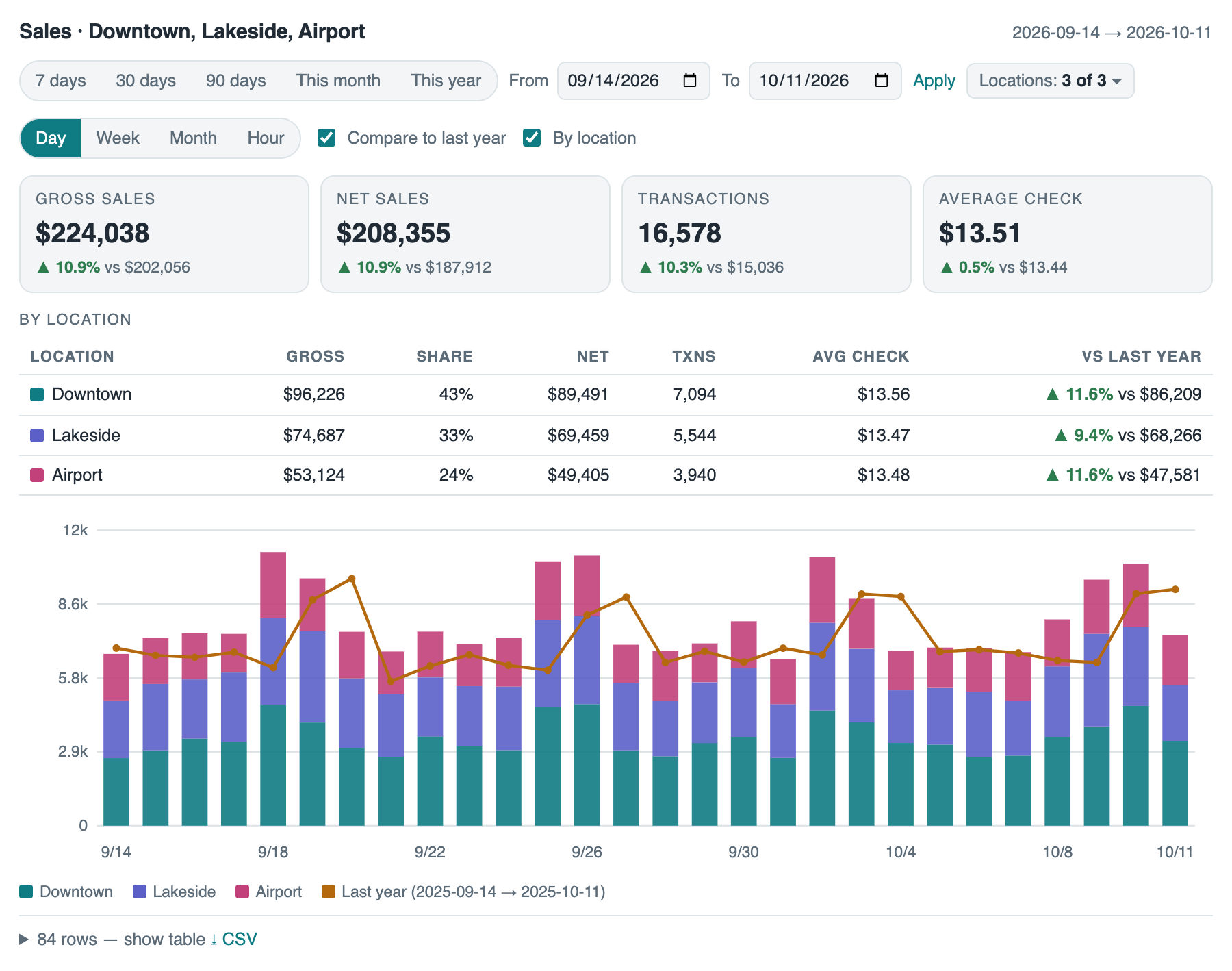
A 40-row table is hard to read in a chat. MCP Apps let a tool return an HTML view that the assistant renders in a sandboxed frame next to its answer. Fran-Trak has five:
| View | What it shows |
|---|---|
| Sales dashboard | Headline numbers, year-over-year change, a chart with last year overlaid, and controls for period and stores |
| Report table | Server-side sorting and paging, with CSV export |
| Status board | A card per store that drills into open online orders and receipts |
| Reorder table | Urgency markers, a target-days slider and editable par levels |
| Order card | Actions to mark an order ready, resend it to the register, message the customer, refund or cancel |
Each view is a single 10 to 14 KB file of plain HTML and JavaScript with no external resources, because the host sandbox enforces a strict Content Security Policy. A small postMessage bridge handles communication with the host in place of the roughly 470 KB SDK bundle. When a user changes the date range or store selection, the view calls the tool again through the host and redraws.
The hardest part was keeping the model’s context current. When a manager selects Mark ready in the order card, the model does not see it, so its next response may be stale or repeat the action. After every action, the view sends the host a short model-context update, such as “Staff used the Fran-Trak order view: the order status is now ready. No further confirmation is needed for this action.” The server instructions tell the model to treat these updates as completed actions. Buttons go through the same server-side confirmation as the model’s tool calls, so a refund from the order card follows the same rules as a refund the assistant starts.
Hosts differ in the details. Claude builds the frame’s Content Security Policy from the metadata on the resource read rather than the resource list, which surfaced when brand logos were blocked. A domain field added for ChatGPT’s validator broke every view in Claude, so ChatGPT now receives its own fields. Download and fullscreen controls appear only when the host advertises support.
Assistant compatibility
The connector works in claude.ai, Claude Desktop, Claude Code, ChatGPT and Google Antigravity. Most of the compatibility work was OAuth and request handling:
| Issue | Fix |
|---|---|
| ChatGPT renders the sign-in page inside a frame | Sign-in cookies use SameSite=None |
| ChatGPT does not exchange the authorization code without a client secret | The server issues a secret at registration |
| The issuer must match exactly, and a trailing slash broke sign-in | One canonical issuer value |
| ChatGPT reads the token audience | Access tokens are readable JWTs |
| Some valid JSON Schemas were rejected | The server simplifies schemas before publishing them |
| The firewall’s anonymous-IP rule blocked assistants calling from cloud ranges | The MCP host is excluded from that rule |
| A sign-in started on one server failed on another behind the load balancer | The servers share their encryption keys |
New permission scopes require users to remove and re-add the connector. The upgrade path is awkward, but assistants are good at telling users to reconnect.
WebMCP
WebMCP is a proposed browser API that lets a web page register tools for an AI agent running in the browser. I added it to the Fran-Trak portal under the Chrome origin trial, with Gemini in Chrome as the agent.
Every portal page registers tools to describe the page, list the reports the user can reach and navigate to one. Report pages add tools that fill in the date and store pickers, run the report and return its rows, read the current report and download it. The dashboard exposes its chart data. The online-orders page lets the agent read the current order, while status changes, refunds and customer messages stay manual. The register-device page’s deactivation tool only opens the confirmation dialog; the change happens only if the user confirms.
WebMCP is not a browser version of the MCP server. Its tools act in the user’s own session on the screen the user is looking at, which suits “help me with this page” and not “compare my stores for last quarter.” Where the two overlap, such as listing and running reports, the tools share names and meanings.
The early API had two details worth knowing: a tool’s execute function must return a plain string, and registerTool is asynchronous, so a rejected promise is the only signal of an invalid tool description.
Using WebMCP requires a browser with a built-in agent and a reason to keep the portal open, and most operators still ask their questions from a phone through the connector. I will renew the origin-trial token to follow the API’s progress. In the near term, WebMCP is most useful for co-browsing, with a person and an agent working on the same page. Longer term, it is a simpler way to expose tools in any web application, which enables higher-level inference.
Recommendations
- Start read-only. Read-only tools scoped to existing roles answer most customer questions and are easy to approve.
- Treat descriptions as product work. When the model misuses a tool, fix the tool description and server instructions first.
- Enforce safety in the server. Put confirmation and safety rules in the server, and document what the server cannot enforce.
- Return views for visual data. Return a view when users need to see a chart, table or order, and tell the model when the user acts in it.
- Budget for OAuth. Test with every assistant your customers use, and expect most of that time to go to OAuth.
- Keep money behind a click. Use WebMCP on pages where people work for long stretches, and keep anything that moves money behind a human click.
Results
Adding these integrations to a large codebase took about a week. I scoped the AI’s capabilities narrowly and expanded beyond read-only access only after validation. Two results stand out:
- Productivity. Asking an agent to refund an order is faster than finding the order on a tablet and working through the screens.
- Insight. With read-only tools and brief training, operators who avoid technology used a chat assistant to understand their business.
Gaps remain. Tool schemas, OAuth implementations and control over the MCP App experience still vary across hosts. Operators also accept two risks from third-party assistants: that the model does not follow instructions faithfully, and that the provider mishandles their data. Data-protection policies and contracts cover both, but I would prefer guarantees I can verify technically. That is a topic for another article.