A blueprint of our house as a Home Assistant dashboard, with html-in-canvas
A 3D blueprint of the house that controls our Home Assistant devices, with room names and the control panel drawn into the scene by Chrome's new html-in-canvas API, and the pitfalls we hit getting there.
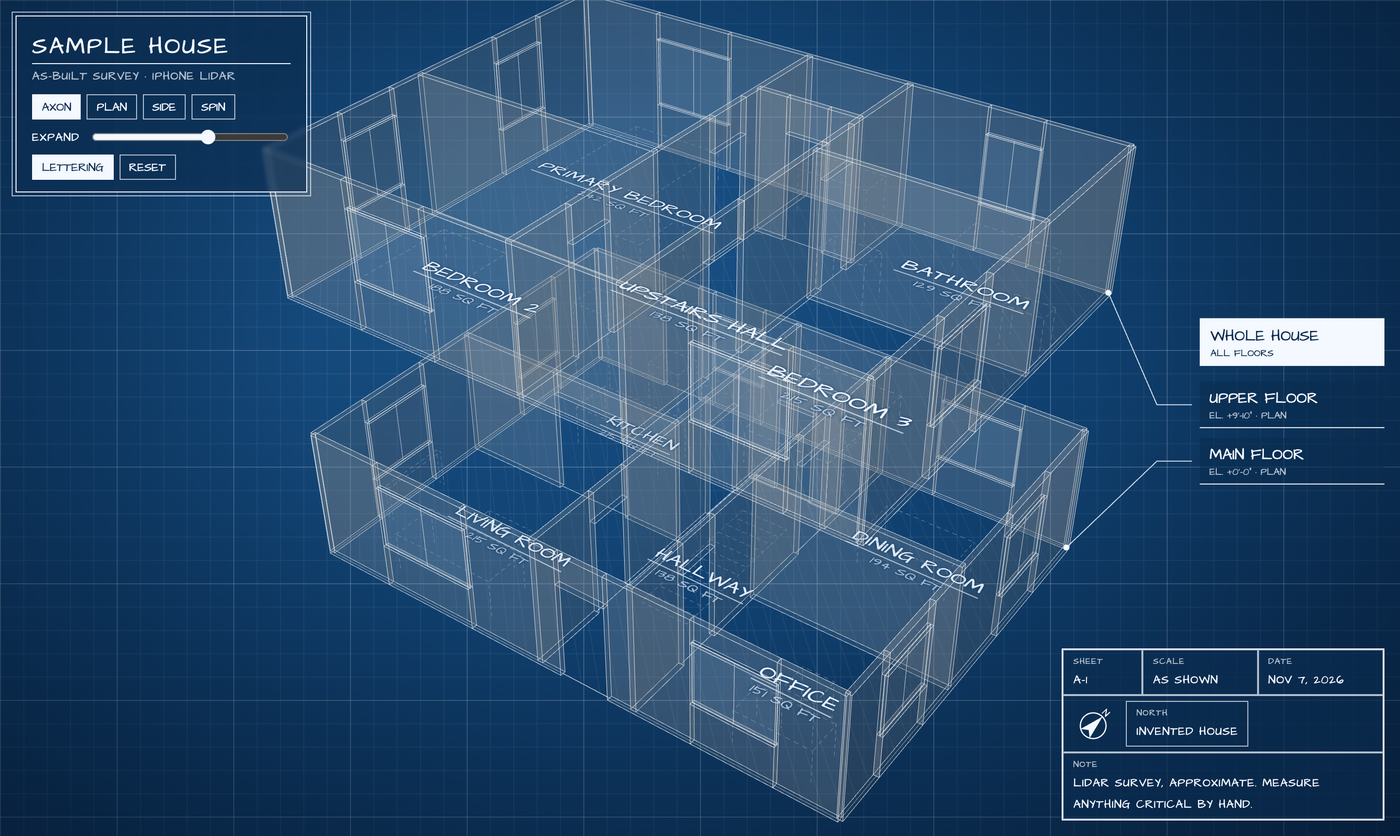
Once House Scan had every floor of our house as data, I wanted to use it for something I’d look at every day: a 3D model of the house, drawn like a blueprint, that I can spin and zoom, tap a room in, and control that room’s Home Assistant devices from. What made it worth building was html-in-canvas, which shipped in Chrome 157. It lets real HTML be drawn inside a WebGL scene and still take clicks. The room names are lettered on the floors in perspective, and the control panel lies on the drawing beside the floor plan. Both are ordinary HTML with ordinary buttons.
The demo below is an invented house with pretend devices, running entirely in your browser. Drag to turn it, tap a floor, then tap a room. In Chrome 157 or later you get html-in-canvas; other browsers get a fallback, described under Other browsers.
The drawing
Each floor’s export lists its walls, doors, windows and openings with their size, position and rotation. The page draws each wall as a thin box with its openings cut out, in white lines on blueprint blue, with translucent faces lit from one side so the planes read as solid. Windows get glass, furniture is drawn dashed, and dimension strings with tick marks run along the outside walls. The lettering is set in Architects Daughter, a typeface based on an architect’s handwriting. On load, the lines draw themselves in, floor by floor.
| Control | What it does |
|---|---|
| Spin and zoom | Drag and scroll, or auto-rotate |
| Expand | Pulls the floors apart to see inside |
| Floor rail | Floor names down the side, with leader lines to each floor. Tap one for its plan. |
| Room names | Tap one for that room’s devices and controls |
What html-in-canvas is
A canvas has always been a dead end for HTML. You can draw anything into it, but text, buttons and forms in a WebGL scene had to be redrawn by hand, or floated over the canvas as a separate layer. A floated layer can’t lie at an angle on a surface, go behind anything, or pick up the scene’s lighting. Libraries such as html2canvas copy a page into a canvas by re-implementing CSS, which only covers the properties they understand.
html-in-canvas lets the browser do it. A canvas marked as drawable lays out its child elements but doesn’t show them. Each frame in which one of them changes, the canvas gets a paint event listing the changed elements, and the page copies each element’s current picture into a texture: drawElementImage for a 2D canvas, texElementSubImage2D for WebGL, and drawElementImageToTexture for WebGPU. From there it’s a texture like any other, so it can go on any surface in a scene.
The other half is input. In a 2D canvas the browser knows where it drew the element. In 3D it can’t, so each frame the page reports where the element now appears with updateElementGeometry, as a transform from the element’s box to the canvas. Chrome hit-tests clicks through that transform, perspective included, and delivers them to the real element.
How the dashboard uses it
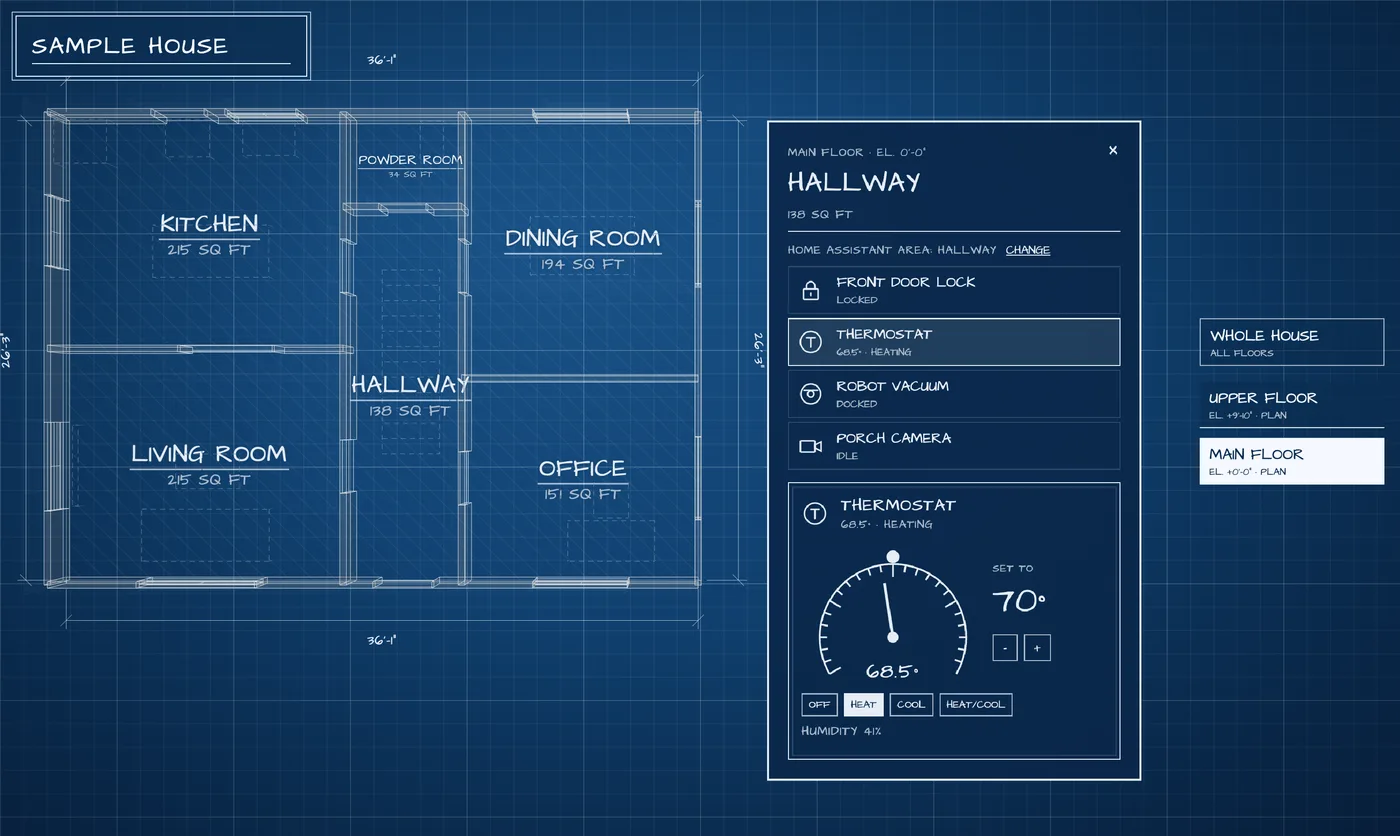
Room names are HTML elements painted flat on each floor. They tilt with the drawing like ink on the paper, and tapping one opens that room. A layer floated over the canvas can’t do this: it always faces the viewer.
The control panel is one HTML element laid on the sheet beside the floor plan, at about one screen pixel per CSS pixel so the text stays sharp. It lists the room’s devices with schematic symbols, the way an electrical drawing marks a lamp or a switch. Selecting one shows its controls: an on/off switch, a ruler of brightness ticks, a dial for the thermostat, lock and unlock, garage door, media and vacuum controls. When a device changes in Home Assistant, the panel’s HTML changes, Chrome fires a paint event, and the new picture is uploaded. There’s no drawing code for the panel at all; it’s styled with CSS like any page.
What Chrome got right
Privacy built into the painting. Any API that turns page content into pixels a script can read is a risk, because the pixels could reveal things the page shouldn’t know. Chrome’s answer is what the explainer calls read-back-allowed rendering: drawn elements never include cross-origin content, visited-link styling, spelling and grammar markers, pending autofill, system colours or IME pop-ups. Because nothing sensitive is ever painted, reading the pixels back is always safe, and there’s no tainted-canvas state to manage. An earlier option to turn this off was removed during the trial.
The elements stay real. A drawn button is still a button. It gets focus, a text field shows its caret, and the explainer says drawn content is exposed to accessibility tools the same way as regular DOM. Once an element has geometry, getBoundingClientRect even reports where it appears on screen, transform applied, which made our end-to-end tests simple to write.
One paint event per frame. The event fires once per frame, after Chrome paints, with only the elements that changed. The dashboard re-uploads a texture only when its element changed, and a DOM change made inside the handler shows up in the next frame instead of looping.
One model across 2D, WebGL, WebGPU and workers. The same element can go to any of the three, and captureElementImage makes a snapshot that can be sent to a worker and drawn into an OffscreenCanvas there.
Pitfalls we hit
The explainer describes the API but leaves out details you need from WebGL, and the API changed shape several times during its trial. These are the problems we hit or designed around, measured in Chrome 157:
| Problem | Cause | Fix |
|---|---|---|
| Blank textures, and “offset overflows texture dimensions” in the console | An element’s painted picture can be bigger than its box, because of outlines and text shadows, so the copy overflows a texture sized to the box | Pass the element’s box as the source rectangle in the upload options |
| Text upside down | The element’s top row lands in texture row 0 | Flip the plane’s texture coordinates |
| Clicks landing in the wrong place | The transform maps the element’s CSS-pixel box into the canvas’s CSS pixels, not its drawing-buffer pixels | Build the transform in CSS pixels |
| Nothing to upload into | texElementSubImage2D copies into an existing texture; it no longer allocates one | Allocate the texture at the element’s size first |
| Labels as wide as the canvas | Drawable children are laid out as blocks | Size them to their content |
| Keeping three.js in step | three.js caches WebGL bindings, and the upload changes one without telling it | Reset three.js’s state after each upload |
| Taps reaching the camera controls | Presses on drawn elements bubble up to the canvas, where the camera controls listen, so a tap could also start turning the house | Stop the press at the panel |
One more, for testing: headless Chrome’s virtual clock barely runs animation frames in a WebGL scene, and an open event stream stops it from finishing at all. We tested in real time instead, driving Chrome with Playwright: click the centre of the box Chrome reports for a room name, check that the panel opened, tap a drawn switch, check that the device changed.
Talking to Home Assistant
The page never holds a Home Assistant token. A small server on the same machine holds it, connects to Home Assistant, and gives the page areas, devices and states, a stream of changes, and a fixed list of allowed actions, such as turning a light on or locking a door. It answers only pages from the same machine, checks where each request comes from, and strips attributes such as camera access tokens. The token belongs to a non-admin Home Assistant user made for the dashboard. Scanned rooms match Home Assistant areas by name where the match is unambiguous; for the rest, the panel lists the areas and you pick one.
Other browsers
For now this is a Chrome feature. WebKit has signalled support and has started implementing the API. Mozilla has no position, and its engineers have raised real concerns there: that the web should move away from building rich UIs in canvas, and that rendering HTML to readable pixels risks creating a “pixel oracle.” The read-back-allowed rendering above is Chrome’s answer to the second. The first is a fair worry for ordinary pages, which should stay HTML. A 3D drawing of a house is the case it fits: the drawing has to be WebGL, and html-in-canvas is what keeps the labels and controls in it real, accessible HTML instead of pixels.
I hope Safari and Firefox ship it. Most of my family’s phones are iPhones, so today they get the fallback: the same HTML floated over the canvas. Everything works, but the room names face you instead of lying on the floor, and the panel sits at the side of the screen. The dashboard detects support at runtime, and all the code that uses the API is in one module, because the names changed several times during the trial and may change again.
What’s next
Next come the outside: cameras, lights and the other devices around the house, with the driveway and landscaping drawn into the blueprint. After that the dashboard moves into Rocco, our family hub. The same scans also gave Pond House, the sticker dollhouse game our kids play on the hub with their friends… a version of our real house, scanned using the House Scan app, too.
The code is on GitHub, in the blueprint folder of the House Scan repository. The scanner itself is covered in the House Scan article.