Rocco: our family assistant
A family hub and voice assistant on a home server, with Claude and Gemini for reasoning, NVIDIA Parakeet for local speech recognition, and our dogs for its personality.
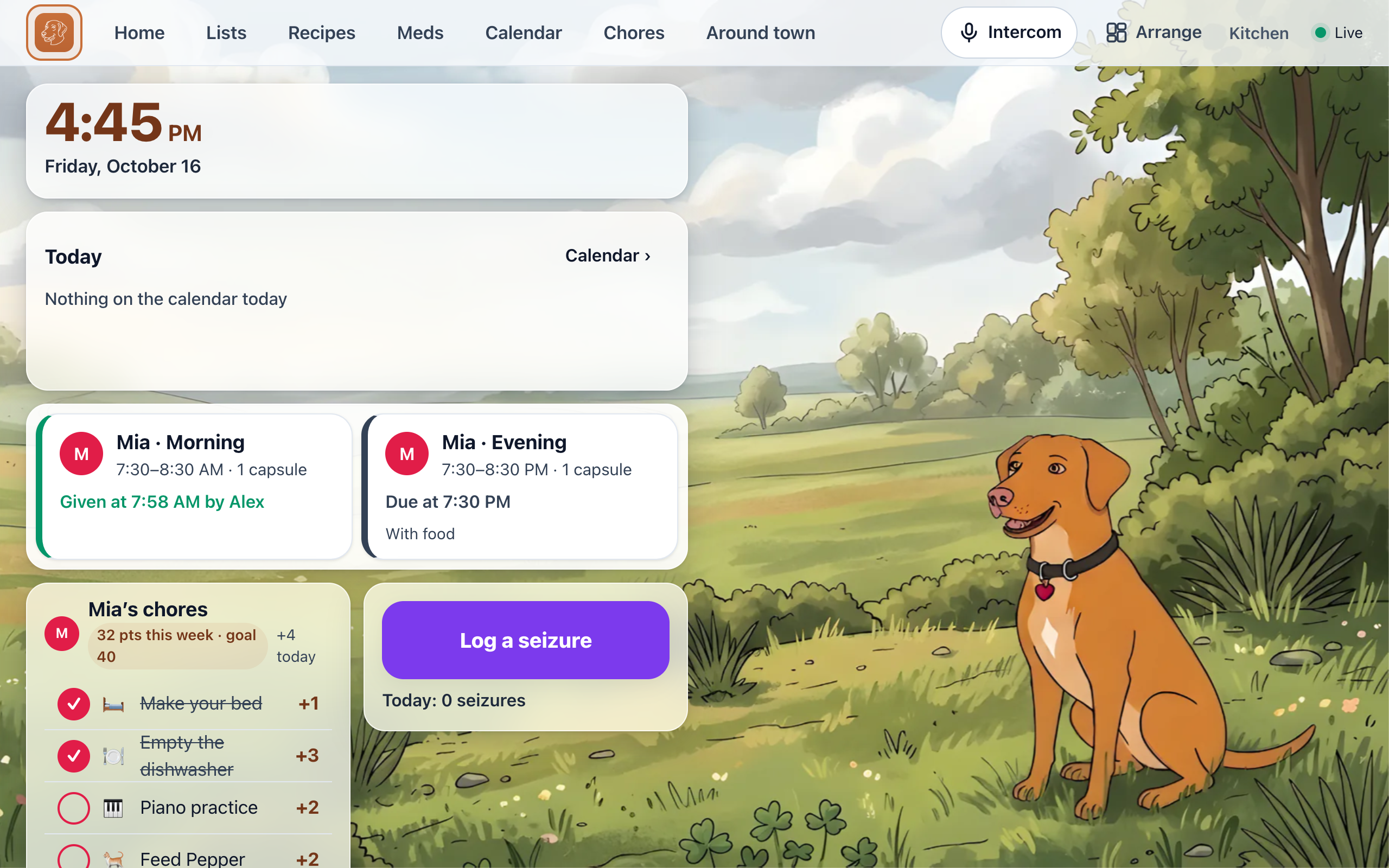
Our family missed practices, homework and chores because information arrived late or in the wrong place. The shared calendar existed, but nobody looked at it, and with two kids, school, sports, chores and a daughter who takes medication twice a day, the gaps added up. Fixing that was also a chance to build something fun and specific to our family.
I built a family hub: a home screen on a kitchen tablet and on our phones, backed by a small server in the house, with a voice assistant named Rocco.
Naming and personality
Rocco was our dog, a reddish Labrador and vizsla mix, who died before this project started. The assistant carries his name: his coat color is the app’s accent color, his blue collar is the button color, and the app icon is a line drawing of him. The home screen rotates through two dozen illustrations of Rocco in different art styles, which I made with Gemini.
Our two current dogs also have roles:
- Scout, a golden retriever who loves to retrieve, handles lookups. When Rocco searches for a recipe, he says “Having Scout retrieve that,” and an animation of Scout running with a paper fills the screen while it loads.
- Teddy, a pit bull mix who watches over the family, handles security. Blocked sites show “Teddy is guarding: YouTube, TikTok,” the doorbell shows “Teddy hears someone at the front door,” and an unlocked door at night sends the parents a notification that starts “Teddy noticed.”

The dogs give the app personality and make the kids want to use it, under two rules: no dog puns, and no dogs on anything related to medication or seizures. A test fails if a mascot appears on a medical screen.
We talk about the dogs, and to them, all the time, so Rocco’s instructions tell him to stay silent when what he hears is not a request, such as “Rocco was such a good boy” or “Teddy, get off the couch.”
Architecture
Rocco has three stages: listening, reasoning and speaking. Listening and speaking run in the house, and only text goes to the cloud.
Speech recognition
The kitchen tablet listens for “Rocco” or “Hey Rocco” with a wake-word model that runs entirely on the tablet. I trained two custom models on synthetic speech, with no recordings of my family. No audio leaves the tablet before the wake word. The hub, a Debian virtual machine on a mini PC, then transcribes the audio with NVIDIA Parakeet TDT 0.6B, running on the CPU through the open-source sherpa-onnx runtime. Audio is never written to disk.
I replaced Whisper with Parakeet after testing both on the same mini PC with recordings from our kitchen:
| Model | Short command (median) | Word error rate, kitchen noise | Word error rate, across the room |
|---|---|---|---|
| NVIDIA Parakeet TDT 0.6B v2 (int8) | 0.5 seconds | 4.0% | 9.7% |
| Whisper small.en | 1.5 seconds | 6.9% | 13.1% |
Parakeet was about three times faster and more accurate in every noisy condition.
Language models
The transcript goes to a language model with Rocco’s tools: calendar, chores, shopping lists, medications, the seizure log, timers and reminders, thermostats, cameras, door locks, the robot vacuum, site blocking, recipes and web search. The hub supports Claude and Gemini behind one interface, with the same tools and instructions. Simple one-step commands, such as “add milk to the list,” go to Claude Haiku. Requests that need more reasoning, such as general questions, recipes and calendar changes, go to Claude Sonnet or Gemini.
Each model has a daily spending cap. When the primary model reaches it, requests move to the secondary and the parents receive one notification. I added the fallback after the day Rocco announced he was “done talking for the day.”
On the first full day, running entirely on Sonnet, Rocco cost about $3. Routing simple commands to Haiku, caching the shared instructions and sending each request only the tools it needs reduced the estimate to about 55 cents a day.
Speech output
Rocco speaks through Piper, an open-source text-to-speech model that also runs on the hub, in English or Spanish. He is available on the kitchen tablet, on our phones, through Siri (“Hey Siri, something for Rocco”), and for one task on an Apple Watch.
Family use
The hub addresses each source of missed information:
- Practices. The hub reads our shared Google calendars and the school and sports schedules. Google can take 12 to 24 hours to refresh a subscribed schedule, so the hub polls the team feeds every 15 minutes, merges duplicates and flags conflicts.
- Chores. Each child has a daily checklist with weekly points, a reminder banner on the kitchen screen and a notification on their phone. A chore missed in the evening can still be checked off the next day.
- Homework. Rocco explains concepts or gives hints and lets the child try, rather than giving the answer.
- Reminders. “Remind my daughter in 20 minutes to feed the dogs” sends a reminder to one person’s phone or to everyone’s.
- Home automation. Rocco controls our smart devices, so “Rocco, mop the kitchen” starts the robot vacuum.
The result is fewer schedule surprises and fewer arguments. The hub is always on, on a tablet mounted to the refrigerator, so checking it is part of passing through the kitchen. Voice works better than any assistant I have used because we built it for our household, and because the tools are our own, Rocco is useful without much setup or prompting.
The medication and seizure features are covered in Tracking our daughter’s seizures with Rocco.
Privacy
A system that knows our schedules, our locks and our daughter’s medical history has to control where that information goes:
- Local audio. The wake word, speech recognition and speech output run in the house. Only the text of a request goes to Claude or Gemini, and only to one of them at a time.
- Short retention. Transcripts are kept for 72 hours, visible only to parents, and never backed up off the server.
- Strong sign-in. Outside the house, the app accepts passkeys only, and parent settings require Face ID again. Admin tools are reachable only on the home network or VPN.
- Private distribution. The apps are installed only on our own devices, because we do not need a public App Store listing.
How it was built
Rocco was largely vibe coded: I described what I wanted, an AI model wrote the code, and I judged the result by whether it worked for my family.
The project started in Gemini. I used it to design the first version of the web app, a prototype the hub later replaced, from a set of technical requirements and one overarching goal: to find the limits of a useful progressive web app (PWA). Claude Code then built the hub over about a week of evenings. With the technical design set, we worked through the initial user journeys: the hub came together on a Thursday, Rocco had a voice by Friday, the seizure log arrived on Saturday, and the Apple Watch and iPhone apps followed by the next Wednesday. Nearly all of the roughly 110 commits are co-written by Claude. Claude also walked me through training the wake-word model locally after Colab kept failing, and I used Gemini for visual polish, including the Rocco backgrounds and the animations. My role was to state what we needed, test it with the family and report what went wrong.
Progressive web app
I built the hub as a PWA because of what the web platform can do now, which is striking to someone who built his first website on GeoCities. One codebase runs on the kitchen tablet, on iPhones from the Home Screen, on Android phones and in desktop browsers. Passkeys handle sign-in, a service worker and Web Push handle notifications, and the wake-word models run in the browser through WebAssembly, so the tablet listens for “Rocco” without sending audio anywhere. One deploy updates every device.
Native wrappers
Two iOS limitations got in the way. A Home Screen web app does not retain microphone permission, so iOS asked for the microphone every time the app opened, and a web app cannot listen in the background. Web Push worked only after the app was installed to the Home Screen and notifications were enabled from a tap, and delivery felt unreliable, which is not acceptable for seizure and medication alerts.
For the iPhone and Apple Watch, I built a thin native wrapper. The iPhone app is a Swift shell around the same web app: it grants microphone access once per install, delivers notifications through Apple’s push service, marked Time Sensitive for seizures, medication and timers, and adds Siri commands. Everything else remains the web app, so each feature is built once. The Watch app is fully native because it does one job: a large button that logs a seizure, with or without a connection.
I still use the web version in my desktop browser, and it works well on Android.
Rocco was the best boy. It is an honor that he can still be with our family, looking after us, in this way.